

In this section we are going to see how to automation Playwright-Jave with TestNG in Page Object Model (POM).
Playwright automation in real-world projects follows the Page Object Model (POM) to keep test code clean, scalable, and maintainable. As applications grow and UI changes become frequent, POM helps separate page interactions from test logic, making updates easier and reducing maintenance effort.
The Page Object Model (POM) is one of the most commonly used design patterns in Playwright-based automation frameworks for production-level projects.
Before proceeding, make sure Playwright with Java and TestNG is set up correctly. Refer to the following link for the complete setup guide: QA Feast Link
Page Object Model
Page Object Model means creating a separate Java class for each web page in the application. That page class contains only the locators and actions related to that page. The test classes call methods from the page classes and form test cases that run in automation.
In simple terms, page classes handle how to interact with the page, and test classes handle what needs to be tested. This separation makes the test code easier to read and easier to maintain.
POM Project Structure
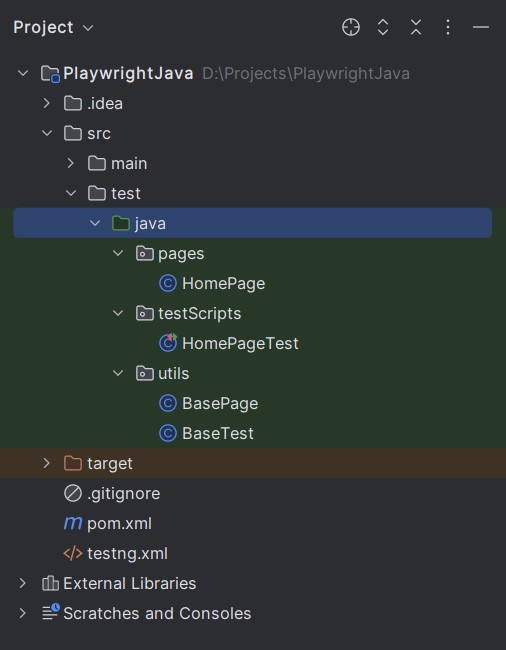
Inside the src/test/java folder, the project is divided into three main packages: pages, testScripts, and utils. Each package has a specific responsibility, which keeps the framework clean and organized.
The pages package contains all the page classes. Each class represents a specific web page and includes only locators and actions for that page.
The testScripts package contains the test classes. These classes define test scenarios and validations by using methods from the page classes.
The utils package contains reusable framework-level code such as browser setup, teardown, and common helper methods.
BaseTest Class
The BaseTest class is responsible for setting up and closing Playwright. It initializes Playwright, launches the browser, creates a browser context, and opens a page before the test execution begins. It also closes the browser and releases resources after the test execution completes.
All test classes extend BaseTest, which means this setup code is written only once and reused across all tests.
File: utils/BaseTest.java
BasePage Class
The BasePage class contains common helper methods that can be reused by all page classes. Instead of writing Playwright actions like click() and fill() repeatedly in every page class, we define them once here.
All page classes extend BasePage, which keeps page classes simple and focused only on page-specific actions.
File: utils/BasePage.java
HomePage Class
The HomePage class represents the Home page of the application. It contains only the actions that can be performed on the Home page, such as accepting cookies, clicking the Tools menu, and navigating to the Demo Site page.
This class does not contain any test logic or assertions. Its only responsibility is to interact with the UI of the Home page
File: pages/HomePage.java
HomePage Test Class
The HomePageTest class contains the actual test scenario. It extends BaseTest, so the browser setup and teardown are handled automatically.
The test method creates an object of HomePage and calls its methods to perform actions. Finally, it validates the result using a TestNG assertion. Because the test uses page methods, the test code is clean, readable, and easy to understand.
File: testScripts/HomePageTest.java
TestNG XML Execution
So far, we have created our Playwright automation framework using Java + TestNG with the Page Object Model (POM). Now let’s see how to execute the tests using testng.xml, which is the standard and preferred way to run TestNG-based automation in real-world projects.
testng.xml Configuration
Create an xml file named testng in the project root folder. Below example testng.xml file configured for this example framework:
Explanation
The <suite> tag defines a TestNG test suite named Playwright Smoke Test Suite.
Inside the suite, the <test> tag groups related tests under Smoke Tests.
The <groups> section ensures that only tests marked with the smoke group are executed. This matches the @Test(groups = "smoke") annotation used in HomePageTest.
The <classes> section points to the test class using its fully qualified name, which in this case is testScripts.HomePageTest, exactly matching the package structure inside src/test/java.
How to Execute Tests Using testng.xml
You can run the tests in two simple ways:
From IntelliJ IDEA
- Right-click on testng.xml
- Select Run 'testng.xml'
Using Maven
Run this command: mvn test -Dsurefire.suiteXmlFiles=testng.xml
Read this link to know for complete testng execution tutorial: https://www.qafeast.com/java-testng/testng_script_execution