

Playwright is a modern, fast, and reliable automation framework created by Microsoft. It is designed to control browsers at the API level using a bidirectional communication channel, which allows faster and more stable interactions with web applications.
Let’s look at how its architecture works.
Browser Automation Model
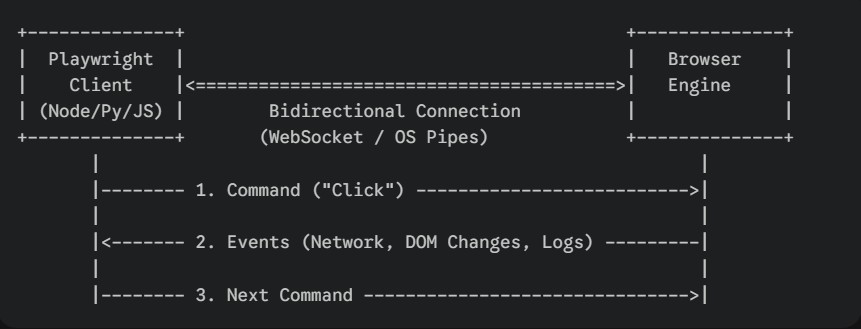
Playwright runs a Node.js process that communicates directly with browser engines such as Chromium, Firefox, and WebKit using the WebSocket protocol. This direct communication eliminates unnecessary middle layers and improves execution speed and reliability.
When a Playwright test runs, the code sends commands (such as clicking an element or typing text) to the Playwright server, which forwards them directly to the browser. The browser executes the actions and continuously sends events (like DOM updates, network responses, or errors) back to Playwright through the same channel.
Because this connection is kept open, Playwright can listen for browser events in real time. This eliminates the need for the HTTP-based communication used by older tools, resulting in lower latency and higher reliability.
Event-Driven Communication
Playwright uses a bidirectional (two-way) communication model with the browser.
This allows:
Browser → Playwright to send events such as console logs, network requests, and page errors
Playwright → Browser to execute commands instantly
Browser Contexts
Playwright introduces a powerful concept called Browser Contexts, which allows you to run:
- Multiple sessions
- Multiple users
- Multiple tabs
- Fully isolated environments
All within a single browser instance.
Example Use Cases
- Testing login flows for different users at the same time
- Running parallel UI tests without opening multiple browsers
- Keeping tests isolated without complex setup
Auto-Waiting Feature
Playwright is designed with auto-waiting built into its architecture.
Whenever a test performs actions such as:
- click
- fill
- navigate
Playwright automatically waits for:
1. Elements to be visible
2. Elements to be actionable
3. Network activity to stabilize
4. Animations to complete
5. The DOM to be ready
This significantly reduces flaky tests and removes the need for most manual waits.
Built-in Multi-Browser Support
Playwright has native support for all major browser engines without requiring any external drivers.
During installation, Playwright automatically installs:
- Chromium (Chrome / Microsoft Edge)
- Firefox
- WebKit (Safari engine)
Built-In Test Runner
Playwright comes with its own built-in test runner, which provides:
1. Parallel test execution
2. Retries
3. Fixtures
4. HTML reports
5. Trace viewer
6. Screenshots and videos
Playwright comes with a built-in test runner, but it can also be integrated with other test frameworks if needed. In contrast, Selenium does not include a test runner and must be combined with frameworks such as:
- TestNG
- JUnit
- MochaJest
Native API Testing Support
Playwright allows API testing and UI testing within the same framework, for example: const response = await request.get('/users');
Faster Execution and Better Performance
Because of its modern architecture, Playwright achieves faster execution through:
- No external browser drivers
- Direct browser communication
- Fewer network hops
- Built-in auto-waiting
- Efficient browser contexts