

In this section, we will write our first Playwright test using basic actions such as goto, click, and fill.
- The click() method is used to click a web element
- The fill() method is used to enter text into an input field
Here, we will pick locators for web elements and use the above-mentioned two methods to run the automation script. To understand how to identify HTML elements and locators, you can refer to the following tutorials:
1. HTML Basics
2. HTML Locators
In the upcoming sections, we will learn about Playwright locators in detail. For now, let’s see how a basic Playwright test looks.
This script will perform the following actions:
1. Open https://qafeast.com
2. Accept the cookie policy
3. Click on Tools > Demo Site
4. Type Hello World into the editable text box
Before Writing the Script
- Make sure Playwright is installed along with the browsers.
- Open VS Code and open the folder where Playwright is installed.
- Inside the tests folder, create a new file named: exampleTest.spec.js
- Copy and paste the following code into the file
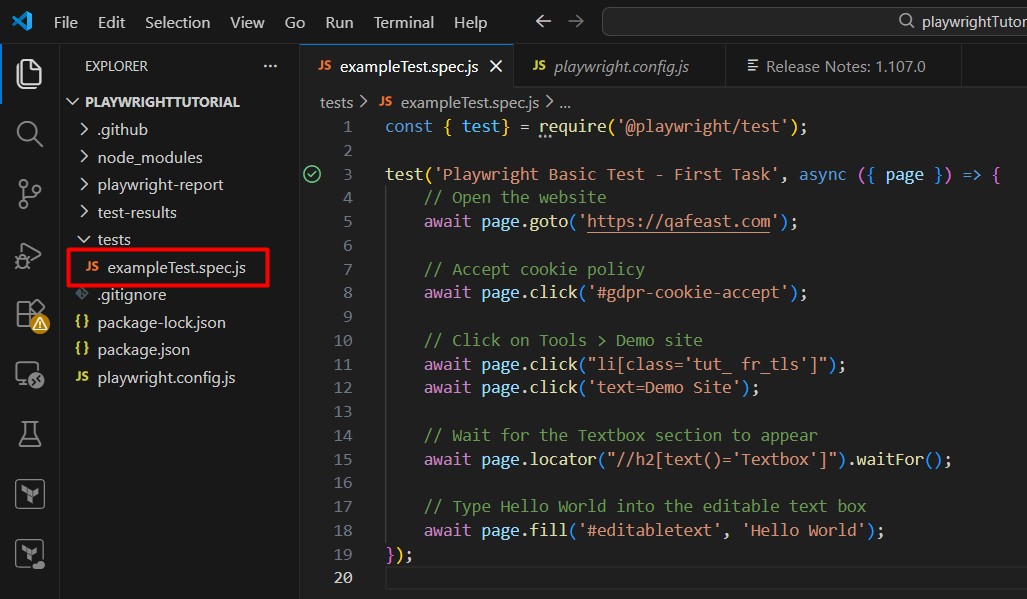 .
.
Example Playwright Test
Explanation
Here, we used the Playwright test fixture and wrote our test inside the test() block. Don’t worry about fixtures and locators for now. We will cover them in detail in upcoming sections.
Execute the Test
Run all tests: npx playwright test
Run a specific test file: npx playwright test tests/exampleTest.spec.js
Run tests in a specific browser (configured in playwright.config.js): npx playwright test --project=chromium